

The Hyperliquid trading journal — no API keys, just your address
Paste your wallet address and JuiceTracker pulls your Hyperliquid perp history — fills, funding, live positions — into a full analytics dashboard. No API keys, no signatures, nothing to secure. It’s read-only by design.
The easiest connection in crypto
- 1
Copy your wallet address
The same address you use on Hyperliquid. That’s the only thing JuiceTracker needs — public data only.
- 2
Paste it into JuiceTracker
Add it on the Accounts page as a Hyperliquid account. No keys, no permissions to configure, no security checklist.
- 3
Trading history appears
Your USDC perp fills backfill automatically, funding payments are attributed, and open positions go live. Syncs keep running in the background from then on.
Real analytics for your Hyperliquid book
Most Hyperliquid tools are wallet browsers. This is an actual trading journal.
Beyond the portfolio graph
Hyperliquid’s built-in graphs show your balance. JuiceTracker shows your behaviour: win rate, profit factor, expectancy, drawdowns, session performance, sizing analysis and calendar heatmaps.
Funding, counted
Perp funding payments are synced as first-class records and netted into your P&L — critical on Hyperliquid where funding accrues continuously on every open perp.
Live positions
Open positions and unrealized P&L update in real time next to your full history — one screen for the whole book.
Merged with your CEX trading
Trade Binance, Bybit or OKX too? Hyperliquid rolls into the same equity curve, calendar and stats — the full picture across DeFi and CEX in one place.
Journal & notes
Annotate days, weeks or single trades, spot recurring leaks, and review your whole year at a glance — or have the AI coach write the post-mortems for you.
AI coach on your history
Ask an AI coach — running on your own Claude subscription — “what’s my expectancy on HL after funding?” or “do I revenge-trade after losses?” and get answers computed from your actual fills.
Your Hyperliquid trading, visualised
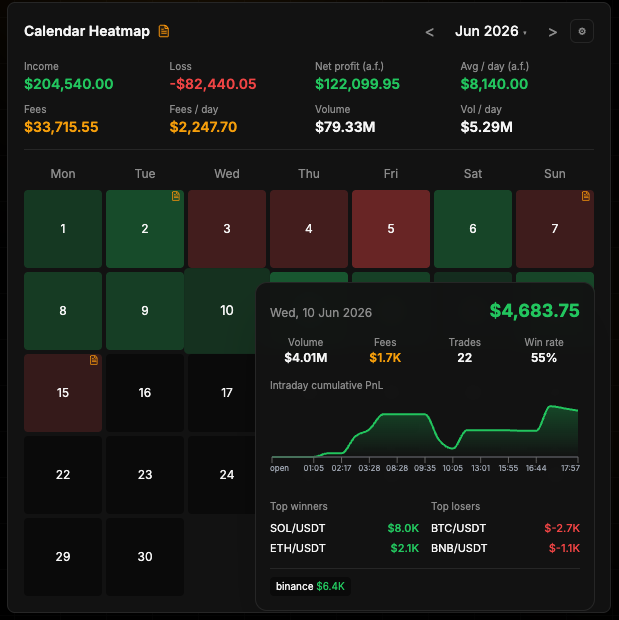
Hyperliquid journal FAQ
Do I need to create an API key for Hyperliquid?
No. JuiceTracker only needs your public wallet address — the data it reads is public on Hyperliquid. There are no keys to create, store or worry about, and nothing that could ever place a trade.
Is this safe? What can JuiceTracker do with my address?
Read, and only read. A wallet address grants no control whatsoever — no trading, no withdrawals, no signatures. It is the same information anyone can view on-chain.
How much history does it import?
Your recent fill history backfills automatically up to the depth Hyperliquid’s API serves, and from the moment you connect, every new trade is captured by ongoing syncs — so the history only gets deeper.
Does it track funding payments?
Yes. Funding on your USDC perps is synced, attributed per position, and netted into your P&L — with a dashboard mode showing results after fees and funding.
Can I track Hyperliquid next to my CEX accounts?
Yes — Binance, Bybit and OKX connect via read-only API keys, and everything merges into one combined dashboard with per-account filters.
What does it cost?
JuiceTracker is currently in a free beta — all features included.
Also on JuiceTracker
Journal your Hyperliquid perps in 60 seconds
Free to start. One wallet address — no keys, no permissions, full analytics.