

The trading journal that keeps up with your Binance futures
Connect a read-only API key and JuiceTracker backfills your entire Binance futures history — every fill, fee and funding payment — then keeps it live. Equity curve, heatmaps, win rate and expectancy, all net of costs, exactly like the money that hits your account.
Connected in three minutes
- 1
Create a read-only key
In Binance, open API Management and create a key with only “Enable Reading” checked — no trading, no withdrawals. JuiceTracker physically cannot touch your funds.
- 2
Paste it into JuiceTracker
Add the key on the Accounts page. Keys are encrypted with AES-256 at rest and only ever used to read your trade data.
- 3
Your history backfills itself
Full multi-year backfill — including accounts with millions of fills — then automatic syncing keeps it current: instantly when a position closes, and on a background schedule.
Built for how Binance actually reports your trading
Most journals show gross numbers. Binance charges you commission on every fill and funding every 8 hours — JuiceTracker nets all of it.
Fees & funding, fully attributed
Commission (in whatever asset it was charged) is converted and netted against every trade, and perp funding payments are synced as first-class records — so your P&L matches your wallet, not a fantasy gross figure.
Fills → trades, correctly
One entry can be hundreds of partial fills. JuiceTracker collapses raw fills into logical trades — across sub-accounts too — so your trade counts and win rate mean what you think they mean.
Live positions & balances
Open positions, unrealized P&L and available balance stream in real time over Binance’s user-data stream. What you see in JuiceTracker is what the exchange sees.
Deep history, no CSV wrangling
No manual exports. Even history older than six months — which Binance’s regular API won’t serve — is backfilled automatically through the bulk download path.
Multiple Binance accounts
Connect as many Binance accounts as you want and view them merged or filtered per account. Heavy books with millions of trades stay fast.
AI coach on your history
Ask an AI coach — powered by your own Claude subscription — things like “what’s my real expectancy after fees on BTC longs?” and get honest answers with sample sizes.
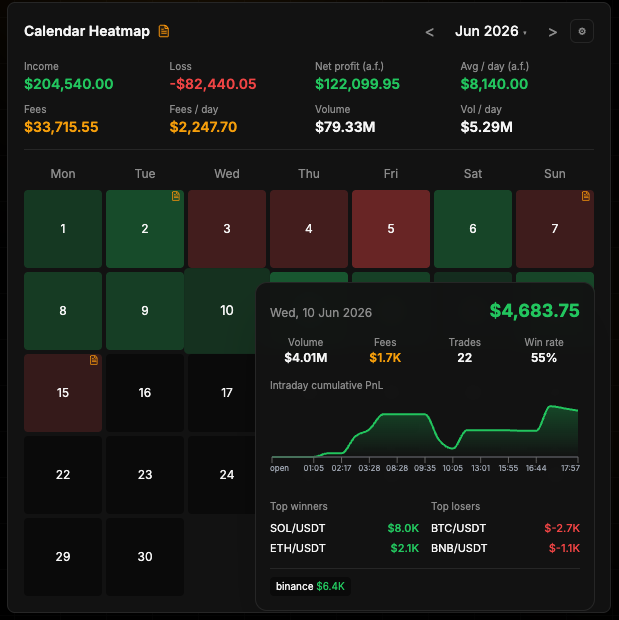
Your Binance book, visualised
Binance journal FAQ
Is it safe to connect my Binance account?
Yes. You create the API key yourself with only read permission enabled — no trading and no withdrawal rights. JuiceTracker stores it encrypted with AES-256 and can only ever read your trade history, positions and balances. You can delete the account anytime and all its data is removed.
Does it import my full Binance futures history?
Yes. JuiceTracker backfills your complete USDⓈ-M futures history, including history older than six months that the standard API does not serve, and including very large accounts with millions of fills. After backfill it stays in sync automatically.
Are funding fees and commissions included in my P&L?
Yes. Funding payments are synced as their own records and commissions are converted and netted per trade. You can switch the dashboard between gross, net-of-fees, and net-plus-funding P&L modes.
Does it work with Binance sub-accounts or multiple accounts?
Yes — connect any number of Binance accounts, each with its own read-only key, and view them combined or filtered individually.
Do I need to export CSV files from Binance?
No. Everything syncs through the API automatically. If you want files for your accountant, JuiceTracker exports your full ledger, funding and daily P&L to a clean Excel file in one click.
How much does it cost?
JuiceTracker is currently in a free beta — all features included. All we ask for is feedback.
Also on JuiceTracker
See your real Binance edge today
Free to start. Add a read-only key and your full futures history backfills in minutes.